Dialed In: August at DripJobs 🎯

August was all about giving you more control over how you see your data and more room to store what matters. You can now shape your Jobs and Sales Lists to match how you actually work, get instant insights on your metrics, keep a fuller picture of every contact, and give customers a portal that's easier to navigate. Here's everything that shipped.
📊 Reporting
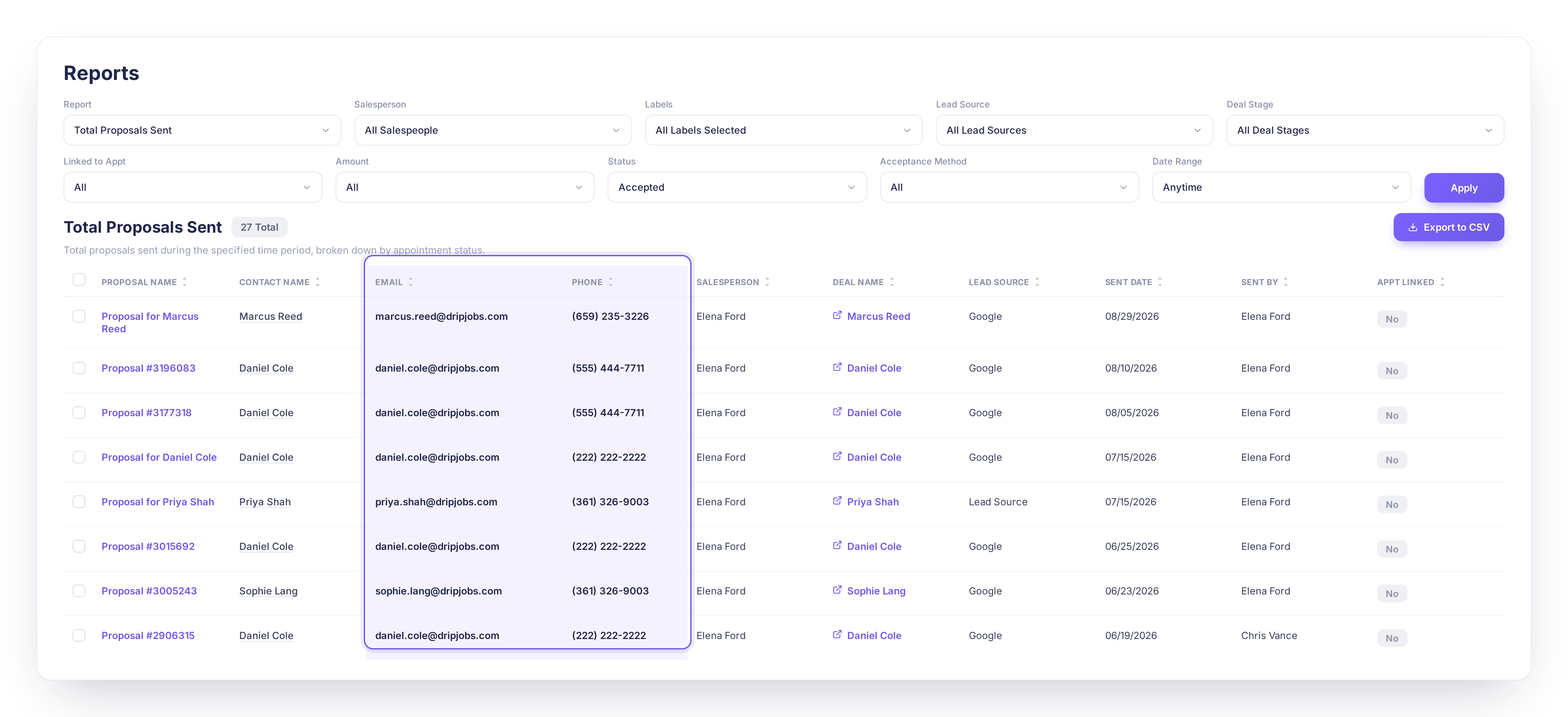
📞 Email and Phone Now Show on Metrics Reports
Your Leads, Closed Deals, Sales, Production, and Total Proposal Sent reports now display each contact's primary email and phone number, both on screen and in CSV exports.
What's new:
✅ Primary email and phone added to five key metrics reports
✅ Visible on screen and included in CSV exports
✅ Matches the contact info already shown on your Jobs List and Sales List
Why it matters: You can reach out to a lead or customer straight from a report instead of hopping over to their contact record first.
Action required: None!
🤖 New: DripSense, AI-Generated Metrics Insights
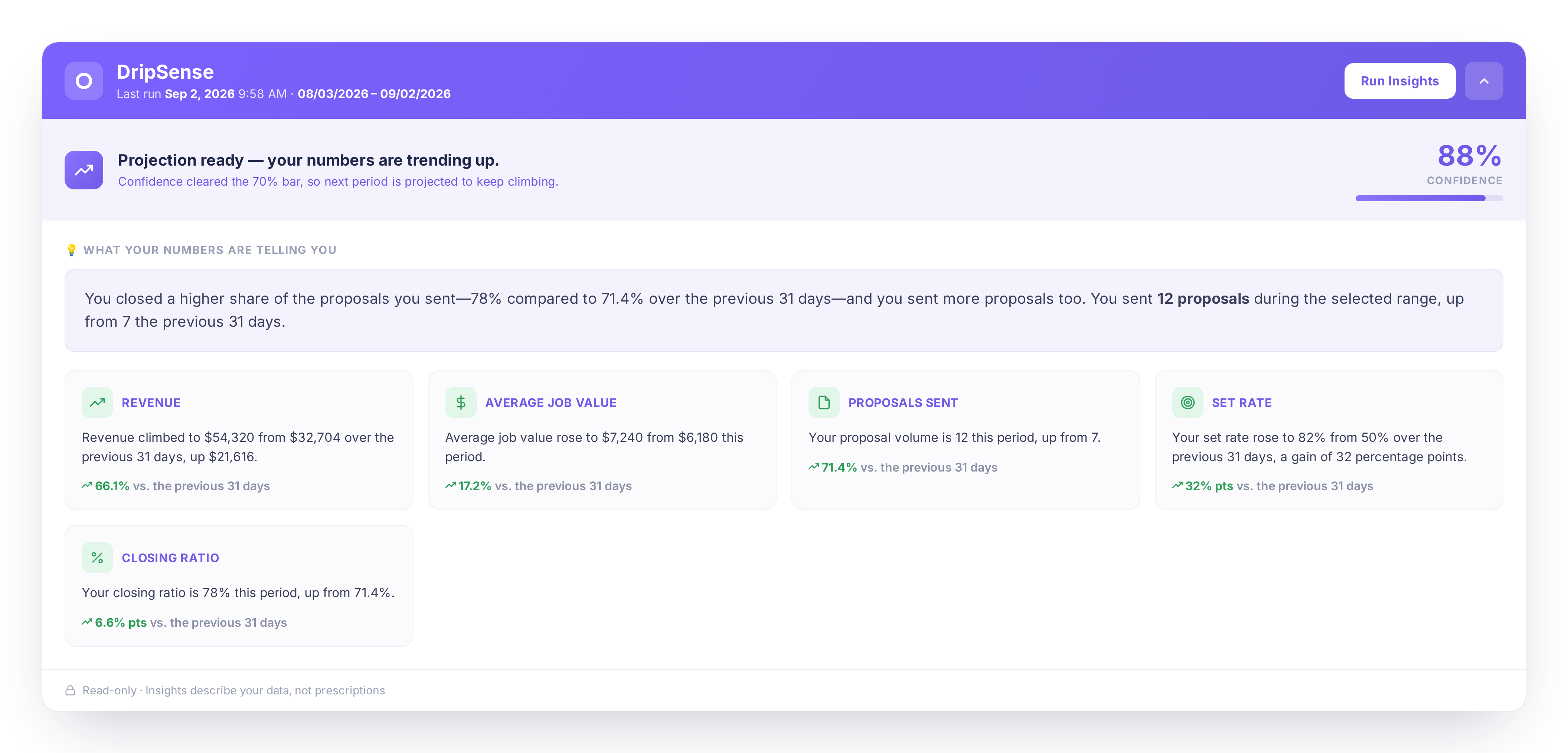
A new DripSense panel on your Metrics Dashboard reads your numbers and writes a plain-English summary of what changed compared to the same period before, so you don't have to dig for it yourself.
What's new:
✅ New DripSense panel on the Metrics Dashboard
✅ Plain-English summary comparing your current numbers to the prior period
✅ Generated on demand with a single click
Why it matters: You get a fast read on what's moving in your business, and often why, without manually comparing charts yourself.
Action required: None! Click "Run Insights" on your Metrics Dashboard to try it.

💼 Jobs & Pipeline
🗂️ New: Column Management for the Jobs List and Sales List
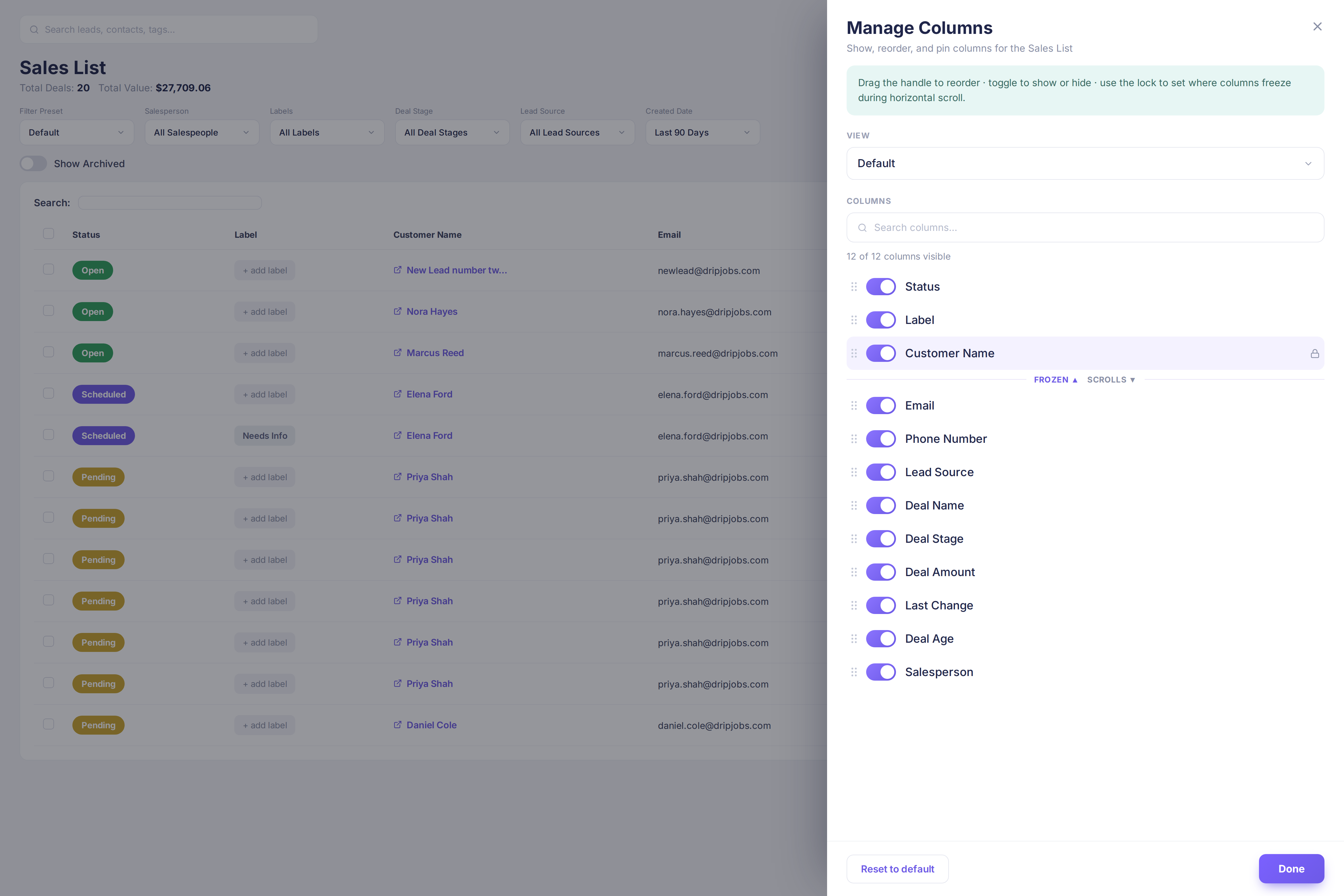
Show or hide columns, drag them into your preferred order, and save your own named views on both the Jobs List and Sales List. Built-in presets are included for common roles, and a freeze option keeps the columns you check most, like Customer Name, pinned in place while the rest of the table scrolls.
What's new:
✅ Show, hide, and reorder columns on the Jobs List and Sales List
✅ Save your own named views, plus ready-made presets
✅ Freeze key columns in place while you scroll
Why it matters: You can build a table that shows exactly what you need to see, instead of scrolling past columns you never use.
Action required: None! Look for the new column management control on the Jobs List and Sales List.
📅 New: Holiday Calendar Display for Appointments and Job Schedule
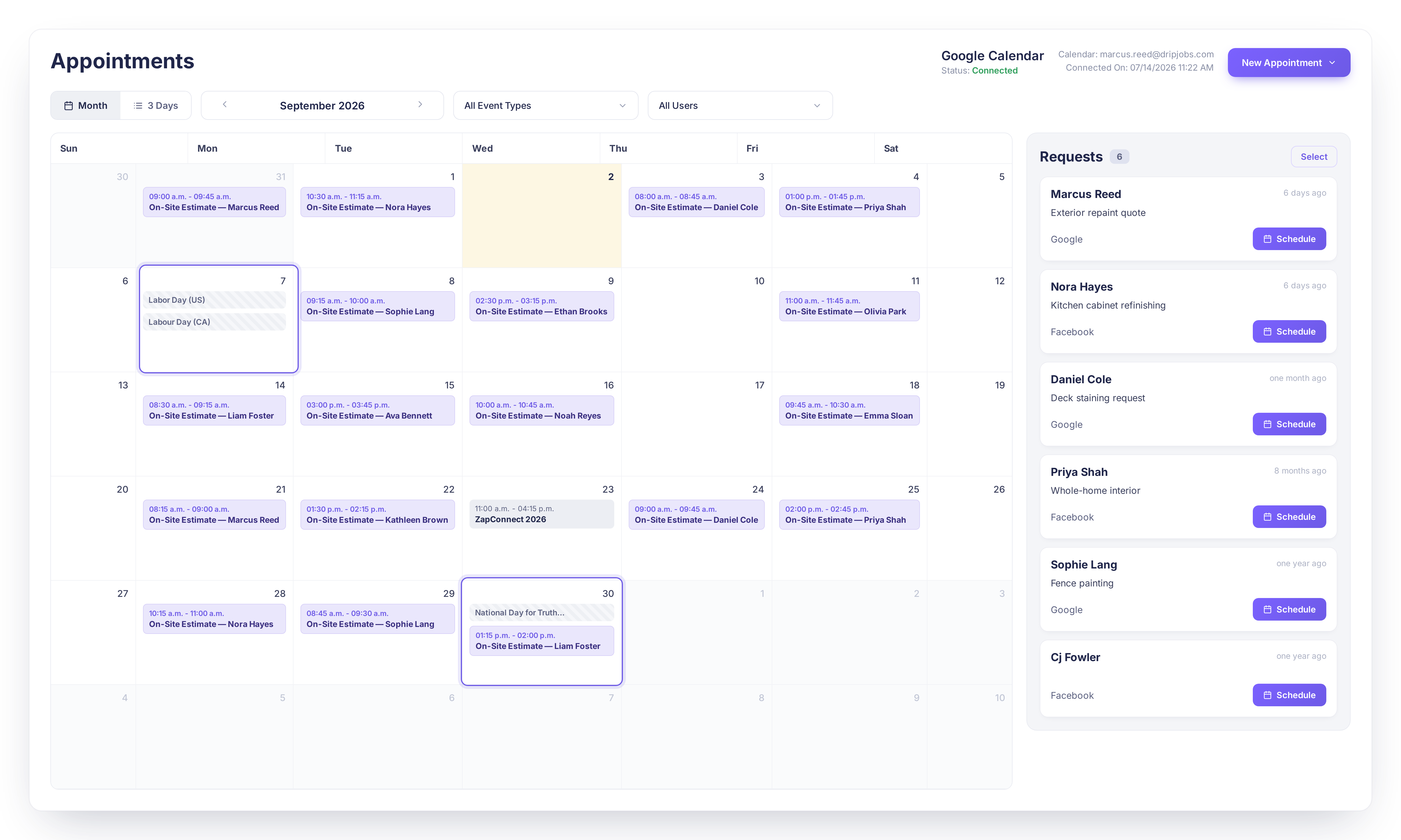
Turn on US holidays, Canadian holidays, or both, and they'll show up automatically on your Appointments and Job Schedule calendars. Holidays are visual only, so you're never blocked from booking a job on one if you need to.
What's new:
✅ US and Canadian holiday options for your calendars
✅ Automatic display on Appointments and Job Schedule
✅ Booking is never blocked, holidays are shown for reference only
Why it matters: You can spot a holiday at a glance instead of accidentally scheduling a job on a day your crew isn't working.
Action required: None! Set your Holiday Calendar preference if you'd like holidays to show up.

👤 Contacts & Customer Portal
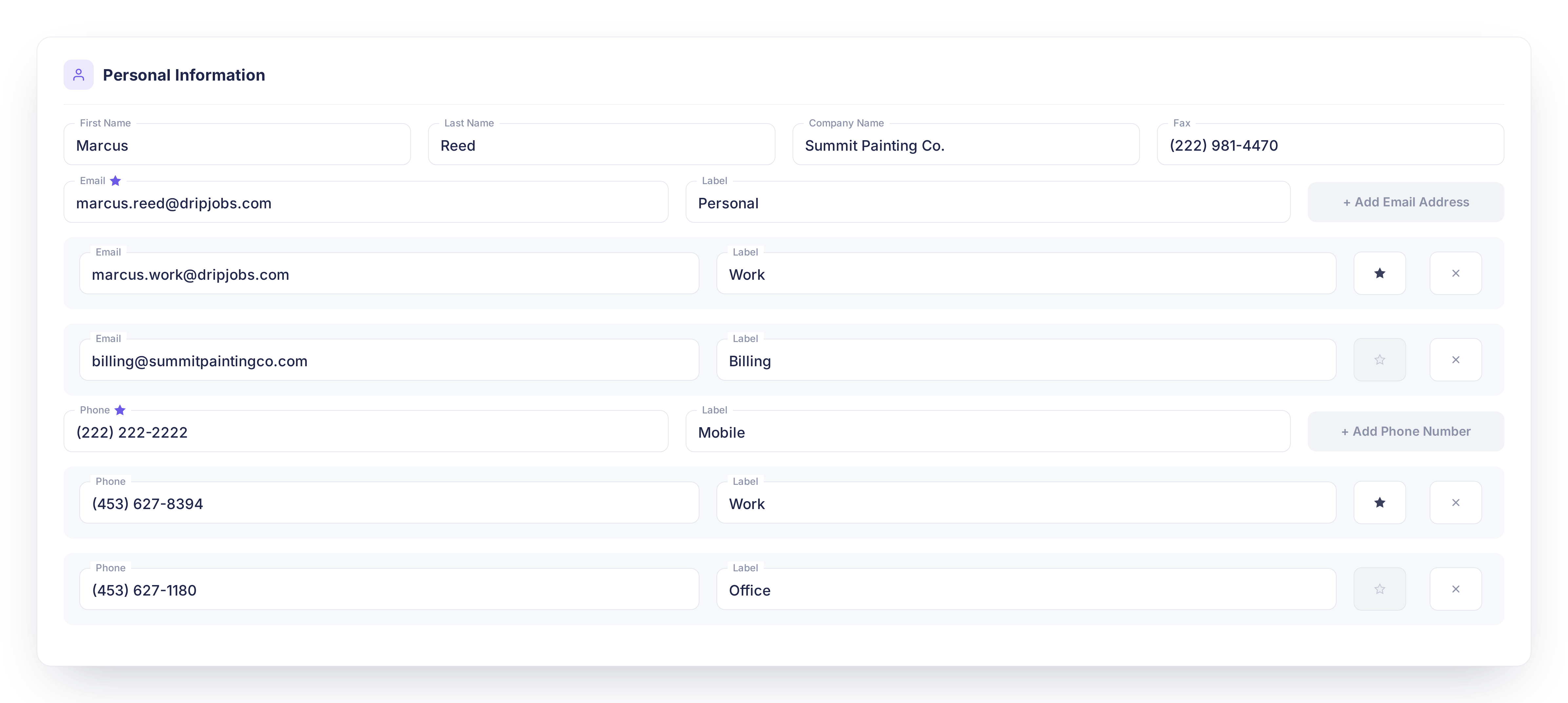
📇 New: Multiple Phone Numbers, Emails, and Addresses on Contact Records
A Contact can now hold more than one phone number, email address, and physical address, with one of each marked as Primary. The Primary values are what's used automatically across proposals, invoices, and outbound communication.
What's new:
✅ Add multiple phone numbers, emails, and addresses per contact
✅ Mark one of each as Primary
✅ Primary values are used automatically on proposals, invoices, and communications
Why it matters: You can keep a complete profile for every contact while staying confident the right number or email is the one your team and DripJobs use by default.
Action required: None!
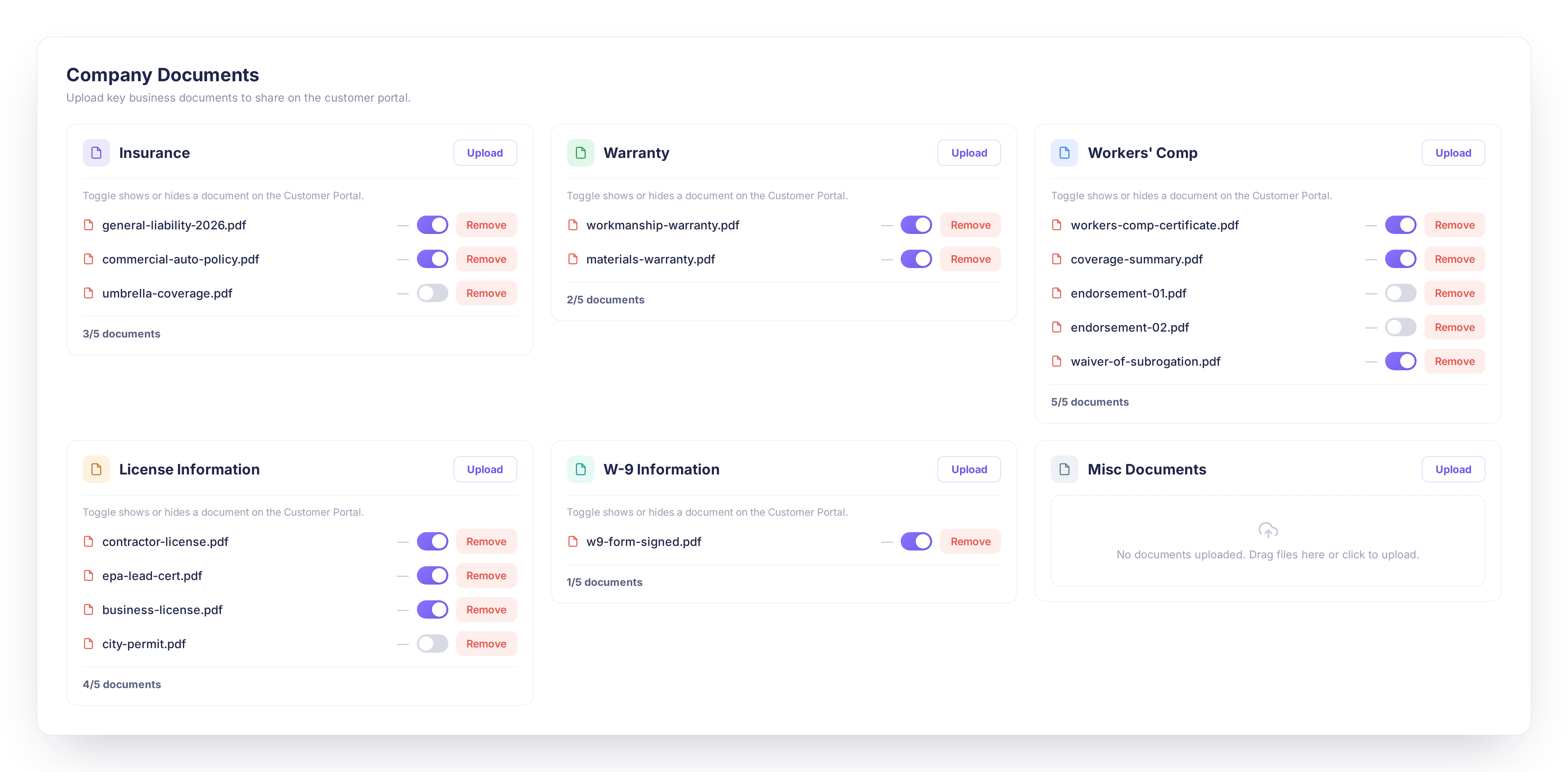
📁 Multiple Documents Per Category in Customer Portal Settings
Every document category, including Insurance, Warranty, Workers' Comp, License Information, W-9 Information, and Misc Documents, now holds up to 5 files instead of just one. You can also build your own custom categories with a title, icon, and color, and reorder them however you like.
What's new:
✅ Up to 5 files per document category, including custom categories
✅ Custom categories with your own title, icon, and color
✅ Drag-and-drop reordering
Why it matters: You can share every license, certificate, and document your customers need without cramming multiple files into a single upload slot.
Action required: None! Look in Company Settings > Customer Portal to see the updated document area.
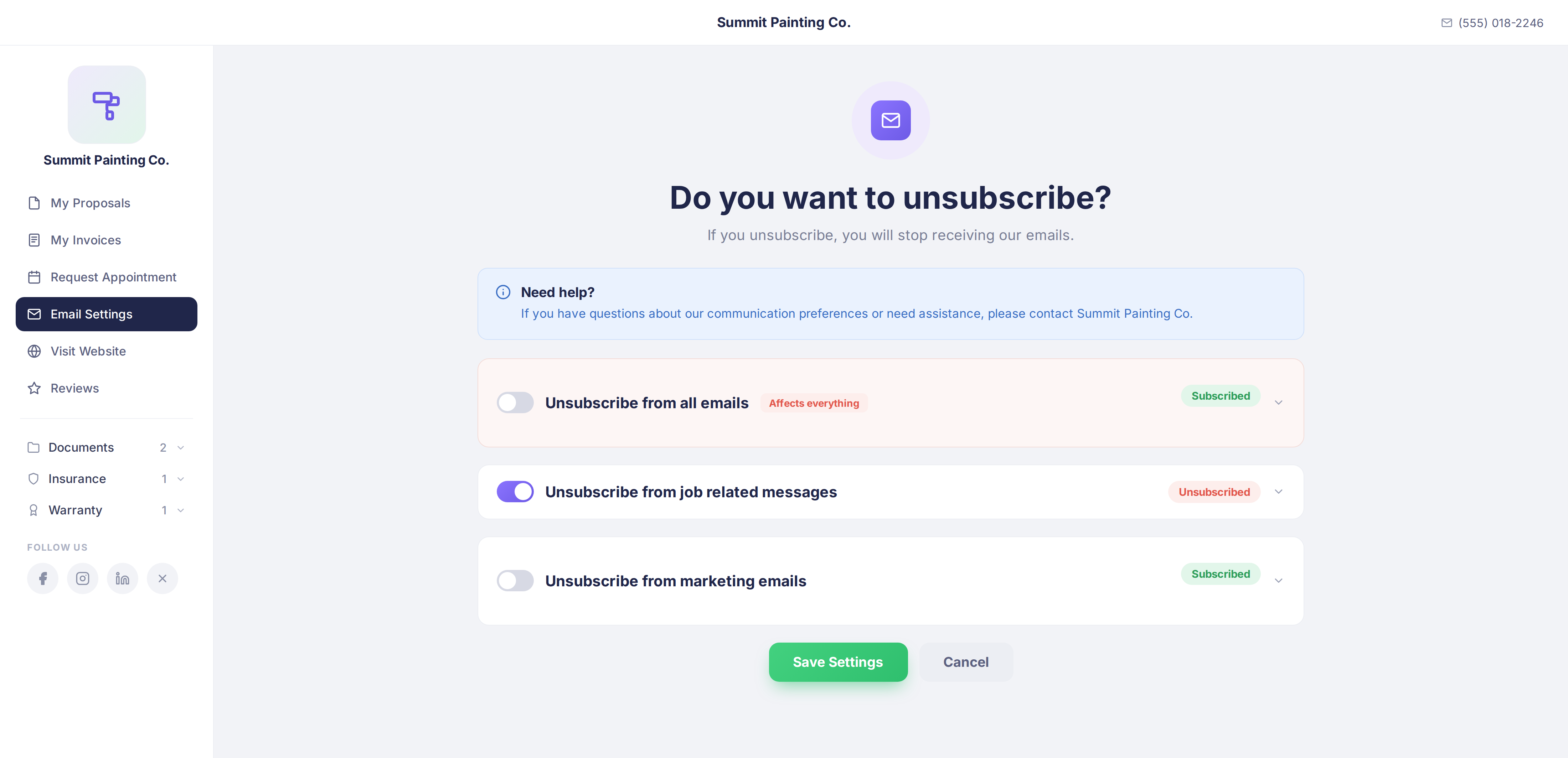
✉️ Customer Portal Email Preferences Page Redesign
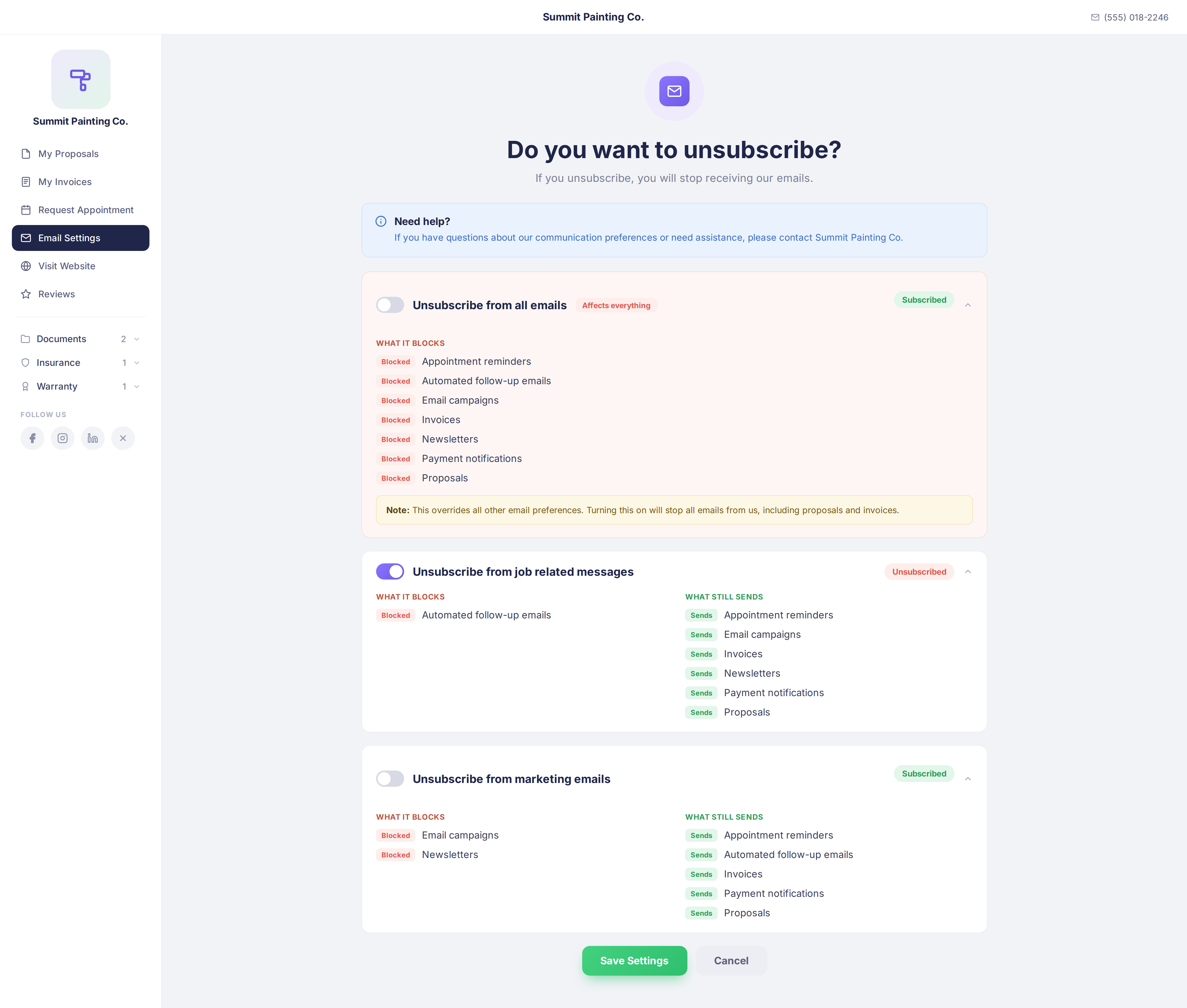
The Customer Portal's email settings page now leads with a clearly styled "Unsubscribe from all emails" option, followed by separate job-related and marketing email choices that customers can expand to see exactly what each one blocks.
What's new:
✅ "Unsubscribe from all emails" given its own distinct warning style
✅ Separate job-related and marketing email options
✅ Expandable detail showing what each option blocks and what still sends
Why it matters: Your customers can see clearly which choice has the biggest impact, so they don't accidentally opt out of everything at once.
Action required: None!
📋 Proposals
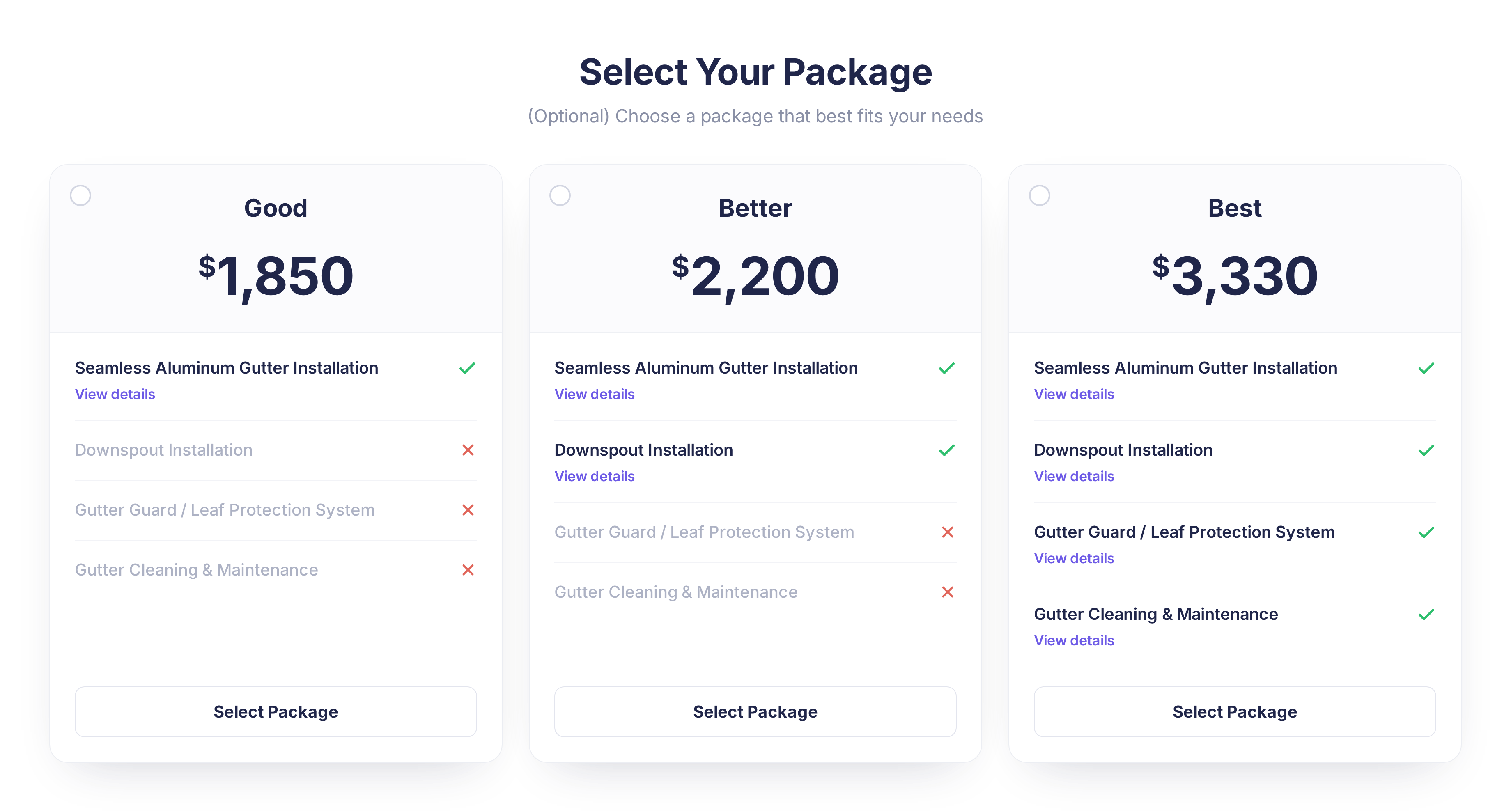
👀 "View Details" Button Replaces Info Icon on Package Line Items
Package line items in the customer-facing proposal now show a clear "View details" button in place of the small (i) icon that only worked on hover.
What's new:
✅ "View details" button added to package line items
✅ Replaces the hover-only info icon
✅ Easier to spot and tap, especially on mobile
Why it matters: Customers can tell right away that more detail is available for a line item, no hovering required.
Action required: None!
💬 Communication
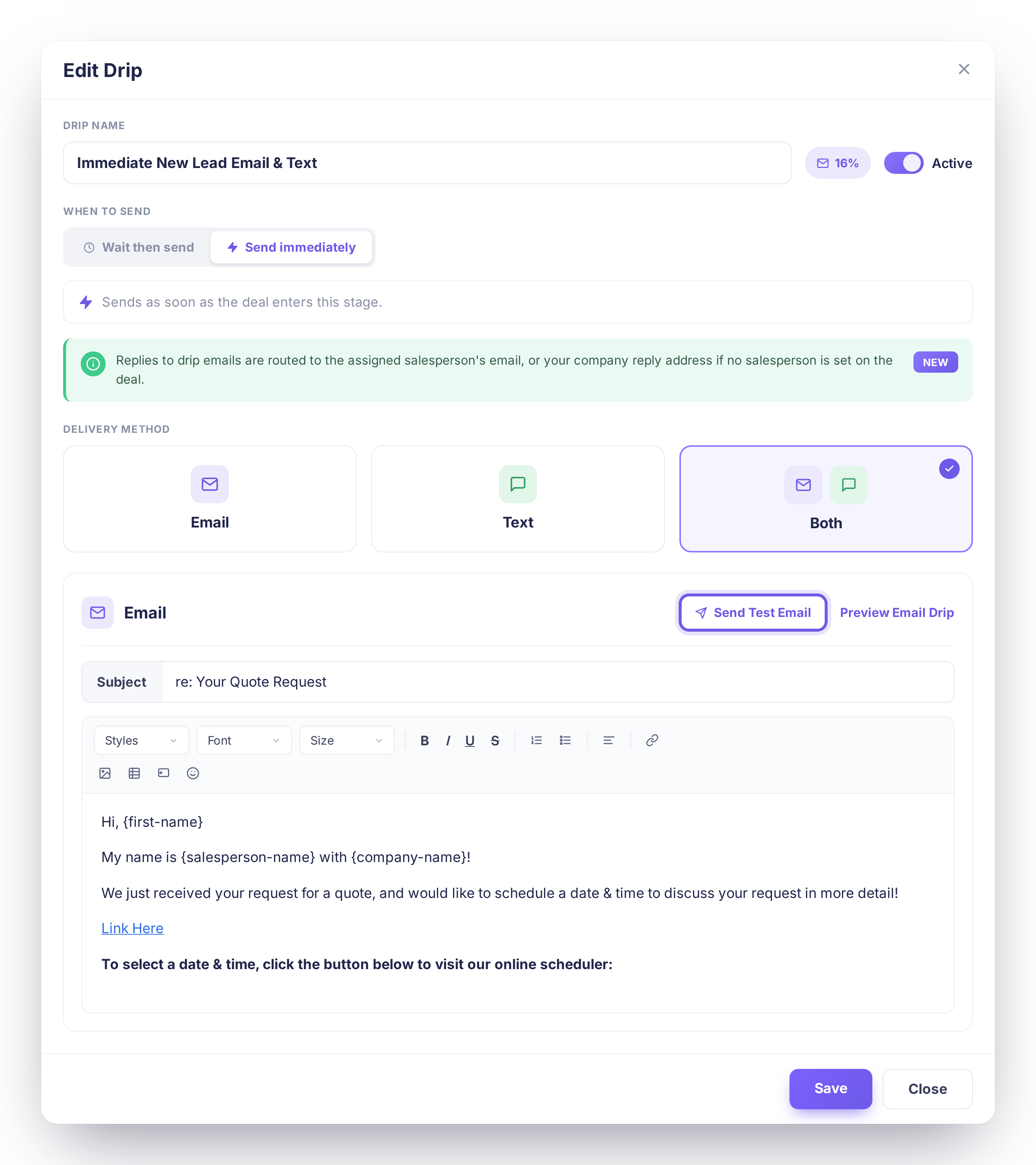
💧Send Test Email for Drips
Send yourself a test copy of a drip email straight from the editor before it goes live. Every keyword fills in with sample data, and the subject line is clearly marked as a test so it never gets confused with the real thing.
What's new:
✅ Send a test copy of any drip email from the editor
✅ Keywords automatically fill in with sample data
✅ Subject line clearly marked as a test
Why it matters: You can check that a drip email looks and reads exactly the way you want before it ever reaches a real customer.
Action required: None! Look for the new "Send Test Email" option when editing a drip email.
Questions about anything above? Reach out to our support team, we love hearing how these updates land in the field.
See all releases anytime at dripjobs.com/whats-new
🎓 Training Opportunities
Want to get the most out of DripJobs? Our team offers refresher sessions to help you master the platform. Whether you need a general overview or want to dive deep into specific features, we've got you covered!
📍 Refreshers – Perfect for brushing up on DripJobs fundamentals Schedule Here
📍 Expert Deep Dives – Advanced sessions on specialized topics:
Zapier Setup – Automate your workflows
Production Rates – Master accurate estimating
Job Costing – Track profitability like a pro
📖 Helpful Resources
📌 Need help with a specific topic? Check out our Help Center!